Example 1: Regression Example
The next code builds a simple Keras model for regression. The next subsections discuss each part in the code.
import tensorflow.keras
import pygad.kerasga
import numpy
import pygad

def fitness_func(ga_instance, solution, sol_idx):
    global data_inputs, data_outputs, keras_ga, model

    predictions = pygad.kerasga.predict(model=model,
                                        solution=solution,
                                        data=data_inputs)

    mae = tensorflow.keras.losses.MeanAbsoluteError()
    abs_error = mae(data_outputs, predictions).numpy() + 0.00000001
    solution_fitness = 1.0/abs_error

    return solution_fitness

def on_generation(ga_instance):
    print(f"Generation = {ga_instance.generations_completed}")
    print(f"Fitness    = {ga_instance.best_solution()[1]}")

input_layer  = tensorflow.keras.layers.Input(3)
dense_layer1 = tensorflow.keras.layers.Dense(5, activation="relu")(input_layer)
output_layer = tensorflow.keras.layers.Dense(1, activation="linear")(dense_layer1)

model = tensorflow.keras.Model(inputs=input_layer, outputs=output_layer)

keras_ga = pygad.kerasga.KerasGA(model=model,
                                 num_solutions=10)

# Data inputs
data_inputs = numpy.array([[0.02, 0.1, 0.15],
                           [0.7, 0.6, 0.8],
                           [1.5, 1.2, 1.7],
                           [3.2, 2.9, 3.1]])

# Data outputs
data_outputs = numpy.array([[0.1],
                            [0.6],
                            [1.3],
                            [2.5]])

# Prepare the PyGAD parameters. Check the documentation for more information: https://pygad.readthedocs.io/en/latest/pygad.html#pygad-ga-class
num_generations = 250 # Number of generations.
num_parents_mating = 5 # Number of solutions to be selected as parents in the mating pool.
initial_population = keras_ga.population_weights # Initial population of network weights

ga_instance = pygad.GA(num_generations=num_generations,
                       num_parents_mating=num_parents_mating,
                       initial_population=initial_population,
                       fitness_func=fitness_func,
                       on_generation=on_generation)

ga_instance.run()

# After the generations complete, a plot is shown that summarizes how the fitness values evolve over the generations.
ga_instance.plot_fitness(title="PyGAD & Keras - Iteration vs. Fitness", linewidth=4)

# Returning the details of the best solution.
solution, solution_fitness, solution_idx = ga_instance.best_solution()
print(f"Fitness value of the best solution = {solution_fitness}")
print(f"Index of the best solution : {solution_idx}")

# Make prediction based on the best solution.
predictions = pygad.kerasga.predict(model=model,
                                    solution=solution,
                                    data=data_inputs)
print(f"Predictions : \n{predictions}")

mae = tensorflow.keras.losses.MeanAbsoluteError()
abs_error = mae(data_outputs, predictions).numpy()
print(f"Absolute Error : {abs_error}")
Create a Keras Model
According to the steps mentioned previously, the first step is to create a Keras model. Here is the code that builds the model using the Functional API.
import tensorflow.keras

input_layer  = tensorflow.keras.layers.Input(3)
dense_layer1 = tensorflow.keras.layers.Dense(5, activation="relu")(input_layer)
output_layer = tensorflow.keras.layers.Dense(1, activation="linear")(dense_layer1)

model = tensorflow.keras.Model(inputs=input_layer, outputs=output_layer)
The model can also be build using the Keras Sequential Model API.
input_layer  = tensorflow.keras.layers.Input(3)
dense_layer1 = tensorflow.keras.layers.Dense(5, activation="relu")
output_layer = tensorflow.keras.layers.Dense(1, activation="linear")

model = tensorflow.keras.Sequential()
model.add(input_layer)
model.add(dense_layer1)
model.add(output_layer)
Create an Instance of the pygad.kerasga.KerasGA Class
The second step is to create an instance of the pygad.kerasga.KerasGA class. There are 10 solutions per population. Change this number according to your needs.
import pygad.kerasga

keras_ga = pygad.kerasga.KerasGA(model=model,
                                 num_solutions=10)
Prepare the Training Data
The third step is to prepare the training data inputs and outputs. Here is an example where there are 4 samples. Each sample has 3 inputs and 1 output.
import numpy

# Data inputs
data_inputs = numpy.array([[0.02, 0.1, 0.15],
                           [0.7, 0.6, 0.8],
                           [1.5, 1.2, 1.7],
                           [3.2, 2.9, 3.1]])

# Data outputs
data_outputs = numpy.array([[0.1],
                            [0.6],
                            [1.3],
                            [2.5]])
Build the Fitness Function
The fourth step is to build the fitness function. This function must accept 2 parameters representing the solution and its index within the population.
The next fitness function returns the model predictions based on the current solution using the predict() function. Then, it calculates the mean absolute error (MAE) of the Keras model based on the parameters in the solution. The reciprocal of the MAE is used as the fitness value. Feel free to use any other loss function to calculate the fitness value.
def fitness_func(ga_instance, solution, sol_idx):
    global data_inputs, data_outputs, keras_ga, model

    predictions = pygad.kerasga.predict(model=model,
                                        solution=solution,
                                        data=data_inputs)

    mae = tensorflow.keras.losses.MeanAbsoluteError()
    abs_error = mae(data_outputs, predictions).numpy() + 0.00000001
    solution_fitness = 1.0/abs_error

    return solution_fitness
Create an Instance of the pygad.GA Class
The fifth step is to instantiate the pygad.GA class. Note how the initial_population parameter is assigned to the initial weights of the Keras models.
For more information, please check the parameters this class accepts.
# Prepare the PyGAD parameters. Check the documentation for more information: https://pygad.readthedocs.io/en/latest/pygad.html#pygad-ga-class
num_generations = 250 # Number of generations.
num_parents_mating = 5 # Number of solutions to be selected as parents in the mating pool.
initial_population = keras_ga.population_weights # Initial population of network weights

ga_instance = pygad.GA(num_generations=num_generations,
                       num_parents_mating=num_parents_mating,
                       initial_population=initial_population,
                       fitness_func=fitness_func,
                       on_generation=on_generation)
Run the Genetic Algorithm
The sixth and last step is to run the genetic algorithm by calling the run() method.
ga_instance.run()
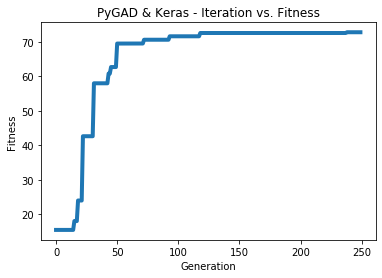
After PyGAD completes its execution, a figure shows how the fitness value changes by generation. Call the plot_fitness() method to show the figure.
ga_instance.plot_fitness(title="PyGAD & Keras - Iteration vs. Fitness", linewidth=4)
Here is the figure.
To get information about the best solution found by PyGAD, use the best_solution() method.
# Returning the details of the best solution.
solution, solution_fitness, solution_idx = ga_instance.best_solution()
print(f"Fitness value of the best solution = {solution_fitness}")
print(f"Index of the best solution : {solution_idx}")
Fitness value of the best solution = 72.77768757825352
Index of the best solution : 0
The next code makes prediction using the predict() function to return the model predictions based on the best solution.
# Fetch the parameters of the best solution.
predictions = pygad.kerasga.predict(model=model,
                                    solution=solution,
                                    data=data_inputs)
print(f"Predictions : \n{predictions}")
Predictions :
[[0.09935353]
 [0.63082725]
 [1.2765523 ]
 [2.4999595 ]]
The next code measures the trained model error.
mae = tensorflow.keras.losses.MeanAbsoluteError()
abs_error = mae(data_outputs, predictions).numpy()
print(f"Absolute Error : {abs_error}")
Absolute Error : 0.013740465