Steps to Use pygad
To use the pygad module, here is a summary of the required steps:
Prepare the
fitness_funcparameter.Prepare the other parameters.
Import
pygad.Create an instance of the
pygad.GAclass.Run the genetic algorithm.
Plot the results.
Get information about the best solution.
Save and load the results.
The next sections explain each step.
Preparing the fitness_func Parameter
Some steps in the genetic algorithm work the same way for every problem, but the fitness calculation does not. There is no single way to calculate the fitness value, and it changes from one problem to another.
PyGAD has a parameter called fitness_func that lets you pass your own function or method to calculate the fitness. This function must be a maximization function, so a solution with a higher fitness value is treated as better than a solution with a lower value.
The fitness function is where the user can decide whether the optimization problem is single-objective or multi-objective.
If the fitness function returns a numeric value, then the problem is single-objective. The numeric data types supported by PyGAD are listed in the
supported_int_float_typesvariable of thepygad.GAclass.If the fitness function returns a
list,tuple, ornumpy.ndarray, then the problem is multi-objective. Even if there is only one element, the problem is still considered multi-objective. Each element represents the fitness value of its corresponding objective.
A user-defined fitness function lets you use PyGAD to solve any problem by passing the right fitness function. It is very important to understand the problem well before you write the fitness function.
Here is an example:
Given the following function: y = f(w1:w6) = w1x1 + w2x2 + w3x3 + w4x4 + w5x5 + w6x6 where (x1,x2,x3,x4,x5,x6)=(4, -2, 3.5, 5, -11, -4.7) and y=44 What are the best values for the 6 weights (w1 to w6)? We are going to use the genetic algorithm to optimize this function.
So, the task is to use the genetic algorithm to find the best values for the 6 weights w1 to w6. The best solution is the one whose output is closest to the desired output y=44. So, the fitness function should return a higher value when the solution’s output is closer to y=44. Here is a function that does that:
function_inputs = [4, -2, 3.5, 5, -11, -4.7] # Function inputs.
desired_output = 44 # Function output.

def fitness_func(ga_instance, solution, solution_idx):
    output = numpy.sum(solution*function_inputs)
    fitness = 1.0 / numpy.abs(output - desired_output)
    return fitness
Because the fitness function returns a numeric value, the problem is single-objective.
Such a user-defined function must accept 3 parameters:
The instance of the
pygad.GAclass. This helps the user to fetch any property that helps when calculating the fitness.The solution(s) to calculate the fitness value(s). Note that the fitness function can accept multiple solutions only if the
fitness_batch_sizeis given a value greater than 1.The indices of the solutions in the population. The number of indices also depends on the
fitness_batch_sizeparameter.
If a method is passed to the fitness_func parameter, then it accepts a fourth parameter representing the method’s instance.
The __code__ object is used to check that this function accepts the required number of parameters. If more or fewer parameters are passed, an exception is raised.
By writing this function, you have completed a very important step toward using PyGAD.
Preparing Other Parameters
Here is an example for preparing the other parameters:
num_generations = 50
num_parents_mating = 4

fitness_function = fitness_func

sol_per_pop = 8
num_genes = len(function_inputs)

init_range_low = -2
init_range_high = 5

parent_selection_type = "sss"
keep_parents = 1

crossover_type = "single_point"

mutation_type = "random"
mutation_percent_genes = 10
The on_generation Parameter
The optional on_generation parameter lets you call a function (with a single parameter) after each generation. Here is a simple function that prints the current generation number and the fitness value of the best solution in the current generation. The generations_completed attribute of the GA class returns the number of the last completed generation.
def on_gen(ga_instance):
    print("Generation : ", ga_instance.generations_completed)
    print("Fitness of the best solution :", ga_instance.best_solution()[1])
After being defined, the function is assigned to the on_generation parameter of the GA class constructor. By doing that, the on_gen() function will be called after each generation.
ga_instance = pygad.GA(...,
                       on_generation=on_gen,
                       ...)
After the parameters are prepared, we can import PyGAD and build an instance of the pygad.GA class.
Import pygad
The next step is to import PyGAD as follows:
import pygad
The pygad.GA class holds the implementation of all methods for running the genetic algorithm.
Create an Instance of the pygad.GA Class
The pygad.GA class is instantiated where the previously prepared parameters are fed to its constructor. The constructor is responsible for creating the initial population.
ga_instance = pygad.GA(num_generations=num_generations,
                       num_parents_mating=num_parents_mating,
                       fitness_func=fitness_function,
                       sol_per_pop=sol_per_pop,
                       num_genes=num_genes,
                       init_range_low=init_range_low,
                       init_range_high=init_range_high,
                       parent_selection_type=parent_selection_type,
                       keep_parents=keep_parents,
                       crossover_type=crossover_type,
                       mutation_type=mutation_type,
                       mutation_percent_genes=mutation_percent_genes)
Run the Genetic Algorithm
After an instance of the pygad.GA class is created, the next step is to call the run() method as follows:
ga_instance.run()
Inside this method, the genetic algorithm evolves over the generations by doing the following tasks:
Calculate the fitness values of the solutions in the current population.
Select the best solutions as parents in the mating pool.
Apply the crossover and mutation operations.
Repeat the process for the given number of generations.
Plotting Results
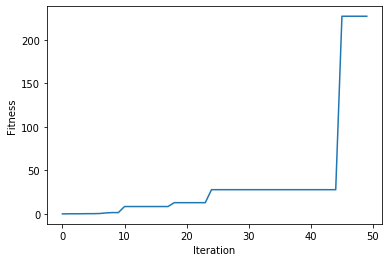
There is a method named plot_fitness() which creates a figure summarizing how the fitness values of the solutions change with the generations.
ga_instance.plot_fitness()
Information about the Best Solution
The following information about the best solution in the last population is returned using the best_solution() method.
Solution
Fitness value of the solution
Index of the solution within the population
solution, solution_fitness, solution_idx = ga_instance.best_solution()
print(f"Parameters of the best solution : {solution}")
print(f"Fitness value of the best solution = {solution_fitness}")
print(f"Index of the best solution : {solution_idx}")
Using the best_solution_generation attribute of the pygad.GA instance, you can get the generation number at which the best fitness was reached.
if ga_instance.best_solution_generation != -1:
    print(f"Best fitness value reached after {ga_instance.best_solution_generation} generations.")
Saving & Loading the Results
After the run() method completes, it is possible to save the current instance of the genetic algorithm to avoid losing the progress made. The save() method is available for that purpose. Just pass the file name to it without an extension. According to the next code, a file named genetic.pkl will be created and saved in the current directory.
filename = 'genetic'
ga_instance.save(filename=filename)
You can also load the saved model using the load() function and continue using it. For example, you might run the genetic algorithm for some generations, save its current state using the save() method, load the model using the load() function, and then call the run() method again.
loaded_ga_instance = pygad.load(filename=filename)
After the instance is loaded, you can use it to run any method or access any property.
print(loaded_ga_instance.best_solution())